Desmos Guide: Plot Functions, Coordinates and Intersections
A free web graphing calculator for expressions, points and tables. Explore variable changes and compare several functions.
What can you do with it?
When a numeric answer does not explain a function’s shape, plotting it can help. Desmos places lines, curves and coordinate tables on a shared graph. Basic graph entry can start without installation or login; account saving and exam permissions are separate. Use it to inspect relationships by changing expressions and ranges rather than as a substitute for proof or every symbolic solution.
Key features
Plot expressions, coordinates and table data together
Explore changes with variable sliders
Export a graph image for explanations
Getting started
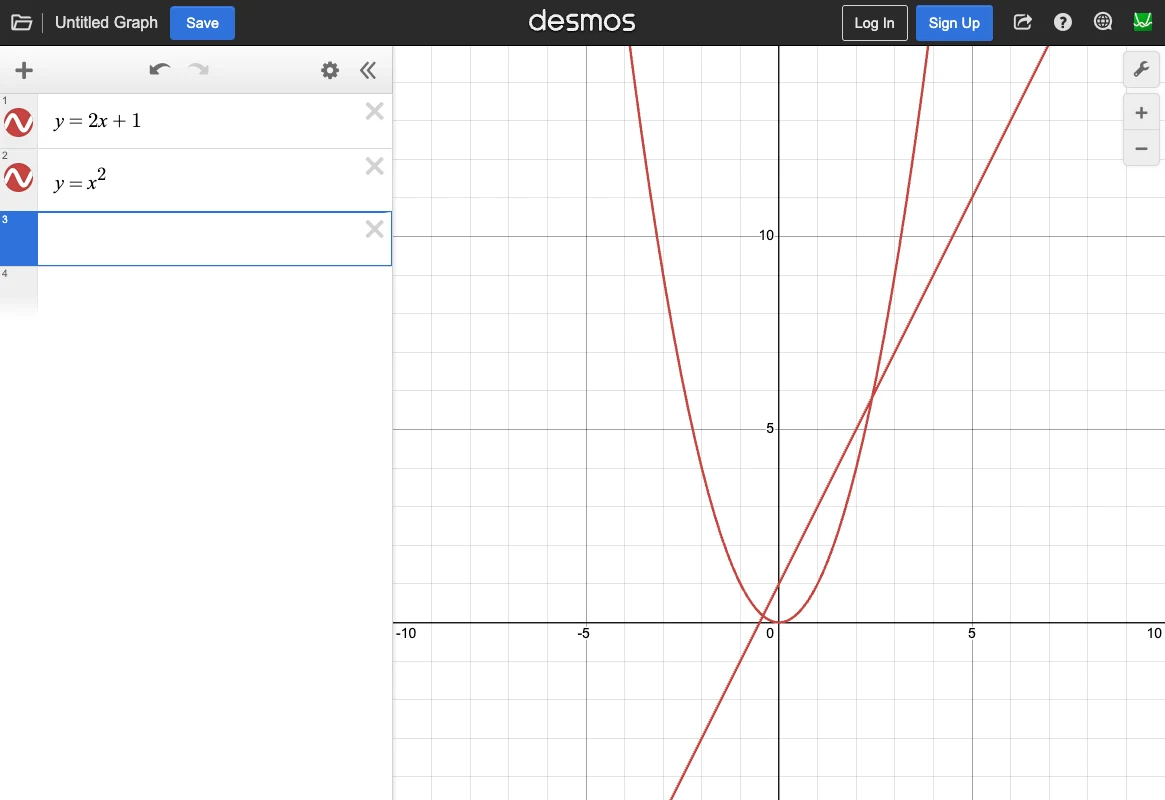
- Open the official Graphing Calculator and select an empty expression line. Start with y=2x+1. Check function names, parentheses and exponent notation before entering more complex expressions.
- Enter y=x^2 on the next line to compare a line and parabola. Toggle visibility with their color icons, then select a curve or point of interest to inspect coordinates. Check the viewport before assuming a missing intersection does not exist.
- Try a variable such as y=a*x+1 and follow the slider prompt. Move a to compare slopes. Change one variable at a time so it remains clear what caused the graph to change.
- For measured coordinates, add a table from Add Item and enter column values. Adjust axis bounds in Graph Settings so the points are visible. For trigonometry, match radians or degrees to the question.
- Use the official Share Graph image export flow to check the visible range and exported result before using it in a handout. Account saving prompts for login. Review the expressions and data a shared graph exposes, and check your institution’s permitted calculator version for exams.
Before you use it
- The general web Graphing Calculator is free. Loading and large calculations depend on the connection and browser.
- Visible intersections depend on expressions, viewport and numerical approximation; a plotted result does not establish a proof or all exact solutions.
- Saving a graph to an account requires login. Exam versions can differ in available functions and default angle mode; this article does not determine exam eligibility.
www.desmos.comDesmos Graphing CalculatorA free web graphing calculator for expressions, points and tables. Explore variable changes and compare several functions. Open official page Sources consulted
Sources checked
Based on public documentation; not a full functional or security audit.